Why Corporate Excel Training and Copilot Upskilling Are Now Essential for Business Growth
Saturday, February 21st, 2026 / by Excel Champ
Corporate Excel Training and Microsoft Copilot Upskilling for Modern Teams Microsoft Excel remains the backbone of business operations across finance, operations, reporting, and analytics. Now, with Microsoft Copilot and AI built into Microsoft 365, the opportunity for productivity gains is even greater. Yet many organizations face a simple challenge: their teams are using only a […]
Read More
Excel Automation in 2026 – The Features That Are Changing How Teams Work with Data
Wednesday, February 11th, 2026 / by Excel Champ
Microsoft has kicked off 2026 with a wave of Excel updates that go far beyond the usual incremental refinements. This year, the theme is unmistakable: automation that actually meets users where they are. Whether you manage financial models, operational dashboards, or enterprise reporting pipelines, the latest round of features is designed to eliminate the manual […]
Read More
Best Practices for AI-Assisted Excel Custom Programming
Friday, January 9th, 2026 / by Excel Champ
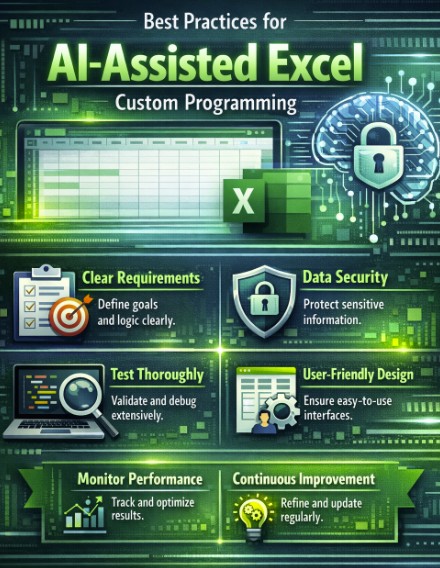
Excel isn’t just spreadsheets anymore. Over the past few years, it’s become a legitimate platform for building custom business applications. Now with Microsoft Copilot baked right into Office, development cycles that used to take weeks can happen in days. But here’s what nobody tells you: speed doesn’t equal quality. We’ve seen companies rush into AI-assisted […]
Read More
How to use Excel for Forecasting, Scheduling, and Analyzing Staffing Levels
Monday, September 15th, 2025 / by ExcelHelp
It’s common for organizations to start out with a simple Excel spreadsheet to manage their staffing needs. As organizations expand, staffing and reporting requirements often become more complex. At this stage, it makes sense to explore Excel for forecasting, scheduling, and reporting. You can create a forecast in Excel using built-in tools like the Forecast […]
Read More
Visualizing Progress: Power BI in Pharmaceutical Research
Wednesday, July 30th, 2025 / by ExcelHelp
TL;DR: Power BI turns complex pharma data into clear, real-time insights for faster, smarter decisions and better collaboration. Custom dashboards, strong security, and easy integration make it ideal for pharma workflows and compliance needs. Supports key areas like clinical trials, supply chains, and sales analytics. Often chosen over Tableau for its lower cost, compliance strength, […]
Read More
Grok + Excel: A Powerhouse for Data Analysis and Automation
Tuesday, July 22nd, 2025 / by Excel Champ
For decades, Microsoft Excel has been the go-to tool for anyone working with data, whether it’s a small business owner balancing the books, a student crunching numbers for a project, or a corporate analyst building complex reports. Its versatility, with features like pivot tables, formulas, and charts, has made it a staple. But what happens […]
Read More
Excel vs. ChatGPT: Which One Should You Use?
Tuesday, July 8th, 2025 / by Excel Champ
You’re probably sipping your coffee, staring at your laptop, wondering how you’re going to tackle that growing pile of work. Maybe it’s a spreadsheet that’s a mess, a report you’ve been dodging, or a presentation that’s still a blank slide. We’ve all been there, and the tools you pick can make or break your day. […]
Read More
New vs Returning Customers Analysis with DAX EXCEL
Tuesday, June 24th, 2025 / by ExcelHelp
In 2025, decoding customer behavior is the heartbeat of business growth, and Excel’s Power Pivot with Data Analysis Expressions (DAX) makes it surprisingly straightforward to analyze new vs returning customers. This analysis shines a light on who’s buying for the first time and who’s coming back for more, revealing insights into acquisition, loyalty, and retention. […]
Read More
ChatGPT + Excel: Your Ultimate Guide to Automation Superpowers
Tuesday, June 3rd, 2025 / by ExcelHelp
ChatGPT from OpenAI can transform the game. By pairing its natural-language processing ability with Excel’s number-crunching muscle, ChatGPT makes automating repetitive tasks, solving challenging problems, and discovering insights easy and effortless. The Powerhouse Combo of ChatGPT and Excel Excel’s tools—formulas, charts, and automation features—can handle various tasks. But crafting the right formula or setting up […]
Read More
Excel Automation: Six Functions to Automate (and How to Do So)
Tuesday, May 20th, 2025 / by Excel Champ
Excel is the unsung hero of business, the go-to for crunching numbers, building reports, and analyzing data like a pro. It’s a powerhouse, but let’s be real—manually updating spreadsheets or scrubbing messy data can feel like a soul-crushing chore. It’s slow, tedious, and just begging for mistakes. The good news? In 2025, automation is giving […]
Read More
Synchronizing CRM Data with Excel for Real-Time Insights: A Comprehensive Guide
Monday, May 5th, 2025 / by Excel Champ
Manually entering data is a total time-suck. It’s not just slow—it’s a recipe for making professional mistakes. One tiny typo can mess up your analysis, and old data can steer you toward lousy decisions. Automation tools save the day by linking your CRM to Excel, keeping your spreadsheets fresh and spot-on. Whether you’re chasing leads, […]
Read More
Excel Hacks: 11 Tips to Work Smarter
Wednesday, April 16th, 2025 / by ExcelHelp
Microsoft Excel is a powerhouse for managing data, but its full potential shines when you know the right shortcuts and techniques. These 11 hacks will help you save time, simplify repetitive tasks, and boost your productivity. Let’s explore each one with detailed examples to make them easy to apply in your daily work. Hack #1: […]
Read More
![Excel Consulting, Development and Training [Expert Consultants]](https://www.excelhelp.com/wp-content/themes/excelhelp-opt7/assets/img/excelhelp-logo.png)